

Nokia 1 TA-1066 FRP Remove On Android 8.0 With MT6737M SP Flash Tool
Sp Flash Tool is the application that is provided and developed by MediaTek company to improve the performance of their processors. Meditek is a world famous IC designer for smartphones, tablets, consumer goods, and many more.

How To Flash Nokia 1 FRP File Using Sp Flash Tool:-
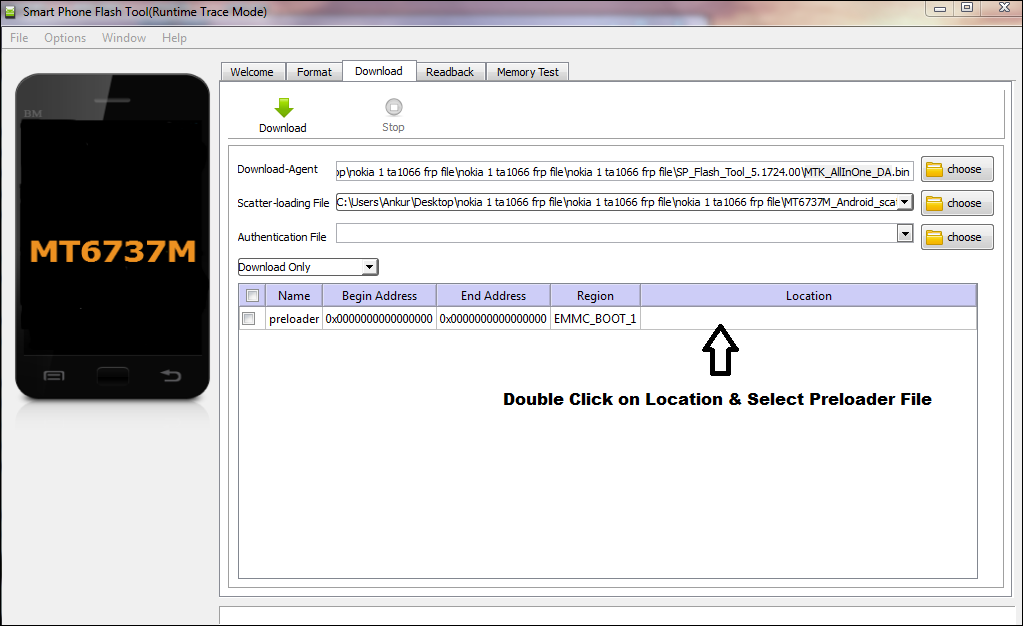
1- Run SP Flash tool.
2- Select DA File as MTK_AllInOne_DA.
3- Load Flash File.
4- Double Click on Location under preloader and select preloader file.

5- Now Open Format Tab under SP Flash Tool and select Manual Address.
Enter, physical_start_addr: 0x5A80000
partition_size: 0x100000
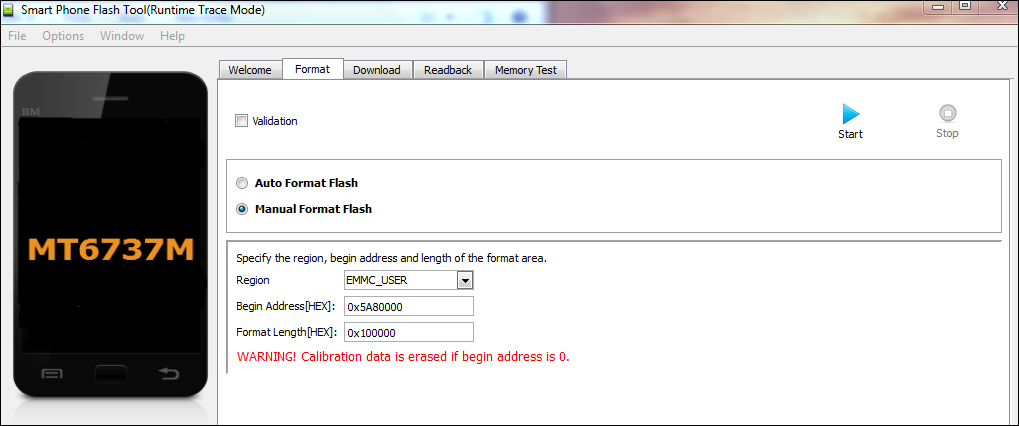
6- Click on Start and connect the phone holding both volume key.
7- FRP will be reset.



![Unlock Tool 2026.05.04.0 Released [Latest Version]](https://blogger.googleusercontent.com/img/a/AVvXsEiybNFqJPBiI-QDL-WNuv813C6nPcquxVmcGGdQrgUv20B8dkwoo8xzvjoDx3Iv3QjgNgvSxjhyVLWCeQxGFBCNXj35bTauYLrM1VyFcTT6JT8Sn3kw2SWDw-Auz_Fo7D7xtEHvMKMwLqsvZ_R20A23yefK3aahcgywEkYU_W3aiBJGh3RFBTbjVWTpEF4-=w100)


1 تعليقات
Where is the link to download scatter file?
ردحذفDo Not Send SPAM Link !!!!