

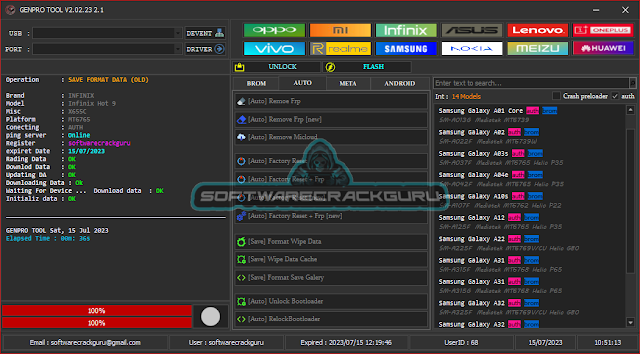

GenPro Tool Features
Unlock:
[BROM]
- Remove FRP
- Erase UserData
- Remove Mi Account
- Fix Preloader
- Save Format Data (Old, New)
- Save Format Data Cache
- Format Save Gallary
- Bypass Auth Preloader
- Bypass Auth Brom Mode
[Auto]
- Remove FRP [Old, New]
- Remove MiCloud
- Factory Reset
- Factory Reset + FRP
- Factory Reset [NEW]
- Factory Reset + FRP [New]
- Save Format Wipe Data
- Save Wipe Data Cache
- Save Format Save Gallary
- Unlock Bootloader
- Relock Bootloader
[META - Unlock]
- Factory Reset
- Format Data
- Format Wipe Data
- Format Wipe Data Cache
- Format Save Gallary
[Repair]
- IMEI Repair
- IMEI 1, 2
- Write
Flashing MediaTek:-
[Universal]
- Read Info
- Erase NVRam
- Remove FRP
- Factory Reset
- Unlock Bootloader
- Relock Bootloader
- Backup NVRAM
- Restore NVRAM
- Remove FRP [NEW]
- Remove MiCloud
- Unlock and Relock Bootloader
Fastboot and Qualcomm Flashing added
Functions Qualcomm:-
[Unlock]
- Factory Reset
- Reset FRP
- Reset EFS
- Unlock Bootloader
- [TAM] Unlock MI Cloud
- [Distri] Disable MI CLOUD
- [TAM] Patch Unlock MiCloud
- [Distri] Patch Disable MiCloud
[Repair]
- IMEI Repair (Both Sim1 and Sim2)
- Enable Multi Sim
- using QCN
- Read QCN
- Write QCN
- Write IMEI
SPD Functions:-
- Reset FRP
- Factory Reset
Changelog
The latest version of GenPro Tool, version 2.0.2.23 2.1, introduces several new features and improvements. The notable changes include:
- Addition of autoloader Qualcomm functionality
- Introduction of select EMI from the server feature
- Inclusion of a fastboot flash bat file for Huawei devices
- Vivo fastboot support using the directory option
- Enhanced fastboot capabilities, including the need to unlock the bootloader
How to install it?
- Download the zip file
- Extract the zip file on the desktop
- Open the folder and run "GarudaGenPro.exe"
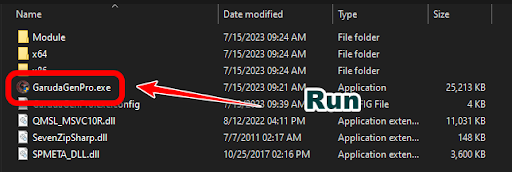
- Next need to register the tool and get a username and password
- Next, fill username password, or email address and click on the registered button.
- Next Back to the login menu and press the login button (Your login data is autosaved there no need to re-enter)
- Enjoy the tool free of cost


Download Link
- Genpro Tool Version 2.0.2.23 2.1 - Download



![Unlock Tool 2026.05.04.0 Released [Latest Version]](https://blogger.googleusercontent.com/img/a/AVvXsEiybNFqJPBiI-QDL-WNuv813C6nPcquxVmcGGdQrgUv20B8dkwoo8xzvjoDx3Iv3QjgNgvSxjhyVLWCeQxGFBCNXj35bTauYLrM1VyFcTT6JT8Sn3kw2SWDw-Auz_Fo7D7xtEHvMKMwLqsvZ_R20A23yefK3aahcgywEkYU_W3aiBJGh3RFBTbjVWTpEF4-=w100)


0 تعليقات
Do Not Send SPAM Link !!!!