

How to Fix Dual Security Issues on Redmi Note 12 4G (tapas) with Locked Bootloader and Any Miui or HyperOS Version
- First, connect your phone to the Diag Port (DFT) and save the QCN file.
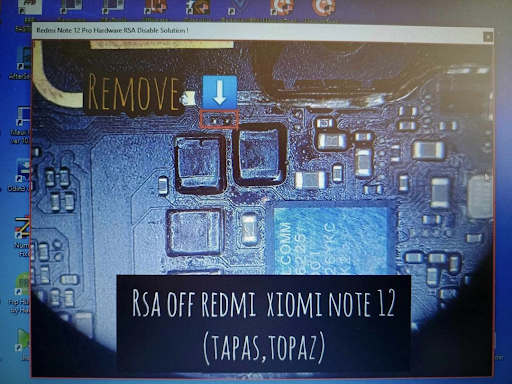
- Next, remove the resistor from the motherboard.
- If your phone is running any Miui version (except HyperOS), then flash the latest Miui version with Auth Flash. Do not disconnect the cable after flashing. Erase the EFS partition with DFT EDL mode. Connect to the Diag Port again and restore the QCN file. This will fix the dual security problem.✅💯
- If your phone is running the latest HyperOS version with high security, then flash the ENG firmware with Auth Flash. Do not disconnect the cable after flashing. Erase the EFS partition with EDL mode. Enable the Diag Port and restore the QCN file. Check the network signal.📶👈
- Finally, reboot your phone to Fastboot mode and flash the latest HyperOS firmware with Fastboot (DFT Pro). This will complete the process.💯✅
Download Link
Tested ENG Firmware Link👇
Tested HyperOS Firmware Link👇
Tested Miui 14.0.14.0 Link👇



![Unlock Tool 2026.05.04.0 Released [Latest Version]](https://blogger.googleusercontent.com/img/a/AVvXsEiybNFqJPBiI-QDL-WNuv813C6nPcquxVmcGGdQrgUv20B8dkwoo8xzvjoDx3Iv3QjgNgvSxjhyVLWCeQxGFBCNXj35bTauYLrM1VyFcTT6JT8Sn3kw2SWDw-Auz_Fo7D7xtEHvMKMwLqsvZ_R20A23yefK3aahcgywEkYU_W3aiBJGh3RFBTbjVWTpEF4-=w100)


0 تعليقات
Do Not Send SPAM Link !!!!