

Guide to Fix OPPO A18 CPH2591 Download Not Complete 100% After Flash Format

Required Tools and Files:
- AMT Tool - Download and install it on your PC.
- Partition Files for OPPO A18 - Download these files (LINK HERE).
Step-by-Step Instructions:
Install AMT Tool:
- Download the AMT Tool from the provided source.
- Install it on your PC following the standard installation procedure.
Download Partition Files:
- Download the necessary partition files for OPPO A18 from the link.
Open AMT Tool:
- Launch the AMT Tool on your PC.
Select Device Model:
- In the AMT Tool, search for the model number "OPPO A18".
- Select the OPPO A18 model from the list.
Open Partition Manager:
- On the right side of the AMT Tool interface, you will see several options.
- Select "Partition Manager".
- A small pop-up menu will appear; simply click the "OK" button.
Connect Your Device:
- Connect your OPPO A18 to the PC.
- Press and hold the VOL+ and VOL- buttons simultaneously for 1 to 2 seconds.
- Check the AMT Tool to ensure the device is connected.
Replace Partition Files:
- Once your device is connected, all partitions of your device will be displayed on the left side of the AMT Tool.
- Locate the partition files you need to replace:
- ocdt file: Double-click on it to replace it.
- Browse to the location of the downloaded partition files.
- Select the corresponding file and confirm the replacement.
- Repeat the above steps for all other partition files provided.
Write Selected Partitions:
- After replacing all necessary files, click on "Write Selected" in the AMT Tool.
- The tool will now write the selected partitions to your device.
- After replacing all necessary files, click on "Write Selected" in the AMT Tool.
Complete the Process:
- Once the operation is complete, disconnect your device from the computer.
- Restart your OPPO A18.

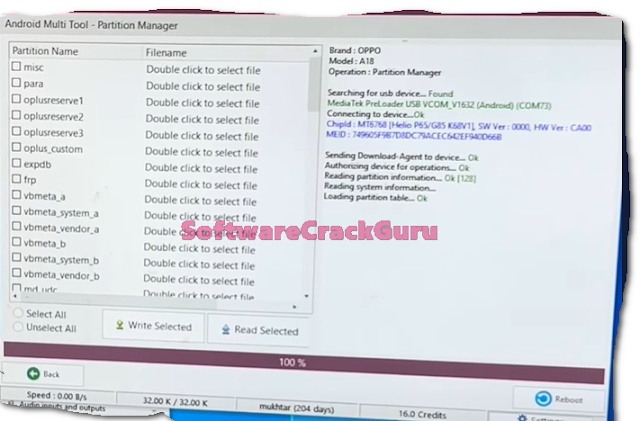


Your device should now be working without any errors, and the issue of incomplete downloads should be resolved.
Note:
Ensure that you follow each step carefully and verify the replacement of partition files to avoid any issues.



![Unlock Tool 2026.05.04.0 Released [Latest Version]](https://blogger.googleusercontent.com/img/a/AVvXsEiybNFqJPBiI-QDL-WNuv813C6nPcquxVmcGGdQrgUv20B8dkwoo8xzvjoDx3Iv3QjgNgvSxjhyVLWCeQxGFBCNXj35bTauYLrM1VyFcTT6JT8Sn3kw2SWDw-Auz_Fo7D7xtEHvMKMwLqsvZ_R20A23yefK3aahcgywEkYU_W3aiBJGh3RFBTbjVWTpEF4-=w100)


0 تعليقات
Do Not Send SPAM Link !!!!